Sunday, 13 June 2010

Week 3

M3G V/S Java 3D
M3G should not be mistaken for Java 3D, which extends the capabilities of the Java SE. Java 3D is designed for PCs that have more memory and greater processing power than mobile devices. M3G and Java 3D are two separate and incompatible APIs designed for different purposes.

3D co-ordinate system
Coordinate systems are used to describe the locations of points in space.
In m3g the orthographic coordinate system is used. In an orthographic coordinate system, the X, Y and Z axis are perpendicular to each other. The right-hand rule is used, with +Y (index finger) being up, +X (thumb) horizontal to the right, and +Z (middle) directed toward the viewer.
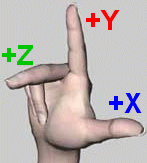
In m3g, three coordinate systems plays an important role:

* World coordinate system.

Is the base on which all other coordinates are being defined.

* Camera coordinate system.

This coordinate system is aligned with the eye or camera. The +Y axis is up, and the -Z axis points out off the camera. In order to render the world, everything in the scene must be transformed to camera coordinates.

* Local (or object) coordinate system.

Each object in the scene is defined in its own local coordinate system. By using a local coordinate system you can create many copies of the object, in different positions and orientations.


Translation by a constant offset [tx ty tz]T moves a vertex a to [ax+tx ay+ty az+tz]T and is expressed by the matrix


The rotation matrices around X-axis is given below:

The scaling Matrix is
Shearing is the last type of transformation and is shown by

M3G Immediate mode - Cube example

Figure:Sample cube: a) Front view with vertex indices, b) Side view with clipping planes (Front, Side)
As you can see in Figure 1, the camera that shoots the 3D scene looks toward the negative z axis, facing the cube. The camera's position and properties define what the screen later displays. Figure b shows a side view of the same scene so you can easily see what part of the 3D world is visible to the camera. One limiting factor is the viewing angle, which is comparable to using a camera lens: a telephoto lens has a narrower view than a wide-angle lens. The viewing angle thus determines what you can see to the sides. Unlike the real world, 3D computing gives you two more view boundaries: near and far clipping planes. Together, the viewing angle and the clipping planes define what is called the view frustum. Everything inside the view frustum is visible, everything outside is not.

This is all implemented in the VerticesSample class, whose members you can see in code
As you can see in Figure 1, the camera that shoots the 3D scene looks toward the negative z axis, facing the cube. The camera's position and properties define what the screen later displays. Figure 1b shows a side view of the same scene so you can easily see what part of the 3D world is visible to the camera. One limiting factor is the viewing angle, which is comparable to using a camera lens: a telephoto lens has a narrower view than a wide-angle lens. The viewing angle thus determines what you can see to the sides. Unlike the real world, 3D computing gives you two more view boundaries: near and far clipping planes. Together, the viewing angle and the clipping planes define what is called the view frustum. Everything inside the view frustum is visible, everything outside is not.

This is all implemented in the VerticesSample class, whose members you can see in code
As you can see in Figure 1, the camera that shoots the 3D scene looks toward the negative z axis, facing the cube. The camera's position and properties define what the screen later displays. Figure 1b shows a side view of the same scene so you can easily see what part of the 3D world is visible to the camera. One limiting factor is the viewing angle, which is comparable to using a camera lens: a telephoto lens has a narrower view than a wide-angle lens. The viewing angle thus determines what you can see to the sides. Unlike the real world, 3D computing gives you two more view boundaries: near and far clipping planes. Together, the viewing angle and the clipping planes define what is called the view frustum. Everything inside the view frustum is visible, everything outside is not.

This is all implemented in the VerticesSample class, whose members you can see in code
package m3gsamples1;

import javax.microedition.lcdui.*;
import javax.microedition.m3g.*;


/**
* Sample displaying a cube defined by eight vertices, which are connected
* by triangles.
*
* @author Claus Hoefele
*/
public class VerticesSample extends Canvas implements Sample
{
/** The cube's vertex positions (x, y, z). */
private static final byte[] VERTEX_POSITIONS = {
-1, -1, 1, 1, -1, 1, -1, 1, 1, 1, 1, 1,
-1, -1, -1, 1, -1, -1, -1, 1, -1, 1, 1, -1
};

/** Indices that define how to connect the vertices to build
* triangles. */
private static int[] TRIANGLE_INDICES = {
0, 1, 2, 3, 7, 1, 5, 4, 7, 6, 2, 4, 0, 1
};

/** The cube's vertex data. */
private VertexBuffer _cubeVertexData;

/** The cube's triangles defined as triangle strips. */
private TriangleStripArray _cubeTriangles;

/** Graphics singleton used for rendering. */
private Graphics3D _graphics3d;

vertex 0 in the figure a is defined as position (-1, -1, 1). I placed the cube's center at the coordinate system's origin.
M3G poses one restriction though: you must build the geometry from triangles. Triangles are popular with 3D implementations because you can define any polygon as a set of triangles. A triangle is a basic drawing operation on which you can build more abstract operations.
Unfortunately, if you had to describe the cube with triangles alone, you would need 6 sides * 2 triangles * 3 vertices = 36 vertices; this would be a waste of memory as many vertices are duplicated. To reduce memory, you first separate the vertices from their triangle definitions. TRIANGLE_INDICES defines the geometry using the indices of the VERTEX_POSITIONS array and can thus reuse vertices.

Code for initializatoin
/**
* Called when this sample is displayed.
*/
public void showNotify()
{
init();
}


/**
* Initializes the sample.
*/
protected void init()
{
// Get the singleton for 3D rendering.
_graphics3d = Graphics3D.getInstance();

// Create vertex data.
_cubeVertexData = new VertexBuffer();

VertexArray vertexPositions =
new VertexArray(VERTEX_POSITIONS.length/3, 3, 1);
vertexPositions.set(0, VERTEX_POSITIONS.length/3, VERTEX_POSITIONS);
_cubeVertexData.setPositions(vertexPositions, 1.0f, null);

// Create the triangles that define the cube; the indices point to
// vertices in VERTEX_POSITIONS.
_cubeTriangles = new TriangleStripArray(TRIANGLE_INDICES,
new int[] {TRIANGLE_INDICES.length});

// Create a camera with perspective projection.
Camera camera = new Camera();
float aspect = (float) getWidth() / (float) getHeight();
camera.setPerspective(30.0f, aspect, 1.0f, 1000.0f);
Transform cameraTransform = new Transform();
cameraTransform.postTranslate(0.0f, 0.0f, 10.0f);
_graphics3d.setCamera(camera, cameraTransform);
}
After the initialization, you render the scene to the screen. code 3 shows this.
/**
* Renders the sample on the screen.
*
* @param graphics the graphics object to draw on.
*/
protected void paint(Graphics graphics)
{
_graphics3d.bindTarget(graphics);
_graphics3d.clear(null);
_graphics3d.render(_cubeVertexData, _cubeTriangles,
new Appearance(), null);
_graphics3d.releaseTarget();
}

M3G's Retained mode
In retained mode, you define and display an entire world of 3D objects, including information on their appearance. Imagine retained mode as a more abstract, but also more comfortable, way of displaying 3D graphics.

Cube Example in retained mopde
protected void init(){
_graphics3d = Graphics3D.getInstance();
_world = new World();
VertexBuffer cubeVertexData = new VertexBuffer();// Create vertex data.
VertexArray vertexPositions = new VertexArray(VERTEX_POSITIONS.length/3, 3, 1);
vertexPositions.set(0, VERTEX_POSITIONS.length/3, VERTEX_POSITIONS);
cubeVertexData.setPositions(vertexPositions, 1.0f, null);
// Create the triangles that define the cube; the indices point to vertices in VERTEX_POSITIONS.
TriangleStripArray cubeTriangles = new TriangleStripArray(
TRIANGLE_INDICES, new int[] {TRIANGLE_INDICES.length});
// Create a Mesh that represents the cube.
Mesh cubeMesh = new Mesh(cubeVertexData, cubeTriangles, new Appearance());
_world.addChild(cubeMesh);
// Create a camera with perspective projection.
Camera camera = new Camera(); float aspect = (float) getWidth() / (float) getHeight();
camera.setPerspective(30.0f, aspect, 1.0f, 1000.0f); camera.setTranslation(0.0f, 0.0f, 10.0f);
_world.addChild(camera); _world.setActiveCamera(camera);
}
protected void paint(Graphics graphics) {
_graphics3d.bindTarget(graphics);
_graphics3d.render(_world);
_graphics3d.releaseTarget();
}

Collision Detection
Collision detection is done in order to determine if two objects collide. Collision detection is an important aspect, as a signifi cant component of the players'interaction in the game is determined by collision queries, and collision response. Performing collision detection is often not possible to do in real-time if certain acceleration algorithms aren't used. Collision handling involves three separate stages when working with object interaction. These stages are collision detection, collision determination and collision response. Collision detection tells us if the objects collide. Collision determination tells us how the objects collide. Lastly the collision response determines how objects are affected by each other after a collision has been detected, such as a change of momentum. Most importantly, one should distinguish between collision detection and collision response, whereas the latter dictates the response which occurs after an actual collision has been detected.
M3G does not support collision detection, but it does provide for simple
picking—that is, shooting a ray into the scene to see which object and triangle it first intersects.
This can be used as a replacement to proper collision detection in some cases.
A method that is used for precise collision detection for convex polyhedral objects is the Voronoi-clip algorithm also called V-clip. The V-clip algorithm is a feature-
based algorithm. The features of a polyhedron are the vertices, edges and faces of the object.

Monday, 7 June 2010

Overview

Mobile Device Platform are of three types :-
Handheld computers - These are small, light, and fit into pockets. They can be connected to the Internet, and users can usually input data or run applications via a pen and a touch screen. Usually they provide icons and buttons on the device that help users to quickly run frequently used applications.
Mobile phones - Modern mobile phones, thanks to new technology enhancements, have evolved from using a voice-based interface (phone calls being the main application) to having powerful network clients. There are many different mobile phones on the market today: JavaTM based, including photo and video cameras, supporting UMTS (universal mobile telecommunications system) and Bluetooth, thousands of color graphics displays, and so on.
Smart Phones - Smart phones are a combination of mobile phones and handhelds with an organizer in a single communication system. Smart phones usually allow wireless connections supporting faxes, e-mail, SMS (short message service), Internet access, applications, and Personal Information Management (PIM) software. They can also be easily connected to a PC via USB cables, wireless interfaces, Bluetooth, or infrared connections.
Mobile devicessupport different operating systems: Microsoft WindowsR, Palm OSR , and Symbian OSTM. Developing tools for Microsoft windows based are Visual BasicR, Visual C++R, etc. Developing tools for Palm OS based mobile devices are C, C++, and Java. Because of the limited heap size, C is preferred to C++ and Java. Last is Symbian OS also known as EPOC. It is a real-time,32-bit multitasking OS that uses C++ and an object-oriented approach.

Mobile Graphics Software
There are several standards emerging in the mobile market today. Mainly these come in the form of API, that can be integrated using different kinds of programming languages like C, C++, or Java. To develop graphics applications and games, programming skills are required, but they aren’t the only thing these kinds of applications need; content and graphics designers are also required. Thus newer standards can be considered as a framework integrating imaging, animation, and geometry representations with programming API. OpenGL is a well-known platform for people working in 3D graphics and games. OpenGL ES is a standard API set for advanced 2D and 3D graphics on handhelds and mobile devices developed by Khronos group, providing graphics interfaces between hardware and software. OpenGL ES royalty-free open standard for the mobile 3D graphics applications and has received wide support from over 50 companies including Nokia, Ericsson, Motorola, Qualcomm, Sun Microsystems, as well as the Tao Group, Symbian, Fathammer, Superscape, and Vicarious Visions. The goal of OpenGL ES is to take into account the real capabilities of mobile devices such as no dedicated floating-point hardware and lack of memory. OpenGL ES API also support the specification JSR-184 as a 3D API for J2ME (Java 2 micro edition).
The OpenGL ES standard API is at a lower level than the J2ME extension, JSR-184 API for mobile 3D graphics. In fact, OpenGL ES is fundamental for standardized access to hardware acceleration solutions for mobile devices. However, coding all the graphics data into a low-level application can result in a huge file requiring too much memory for a mobile device or too much bandwidth needed for transferring among devices. JSR-184 helps in this case because it allows graphics designers and developers to define a scene with a platform-independent set of API (Java-based), simplifying the production and distribution of contents. JSR-184 stands on top of OpenGL ES API, and a device supporting both standards will benefit both from hardware acceleration and an abstraction layer. Moreover, both API enable applications to run on products ranging from mobile phones to workstations, making it easy and affordable to offer a variety of advanced 3D graphics and games across all major mobile and embedded platforms. The JSR-184 is complementary to OpenGL ES, and the rendering modes are compatible, so the graphics hardware that accelerates OpenGL ES will also accelerate JSR-184 API. Three-dimansional graphics on mobile devices are rapidly growing in response to market demand. JSR 184 is already a requirement for major operators worldwide, and devices that implement the API are already on the market.

M3G
Mobile 3D Graphics API, M3G also known as JSR-184. Though 3D graphics already exists(JAVA3D), but it is unsuitable because most mobile devices have limited memory and processor power. Therefore the need was for a scalable, small-footprint, interactive 3D API for mobile devices that could work as an optional package for J2METM to allow 3D graphics. M3G is a software package for providing 3D graphic functionalities to a wide range of devices. Thus M3G is designed to be a 3D API suitable for the J2ME platform and CLDC(Connected Limited Device Configuration) /MIDP(Mobile Information Device Profile).
One question arises that what was the need for a new mobile 3D Graphics standard when OpenGL ES is already available. OpenGL ES is a low-level API standard, since it’s based upon OpenGL; in fact, even for building simple 3D scenes it requires developing many lines of code, while there’s a need for having a compact version of the final application. M3G is a high-level library designed to be compatible with OpenGL ES API. It is not a competitor, but it’s more a complement to the OpenGL ES API set. The main three advantages over OpenGL are :-
• Enhances developer’s productivity.
• Minimizes code size of graphics applications.
• Increases applications’ performance.

Immediate and Retained Mode
The main class for drawing a scene with M3G standard is the Graphics3D class. It is accessed via the getInstance() method. Graphics3D supports two different drawing modalities:

1. Immediate mode
• This is a low-level modality that allows defining each detail of a drawing process.
• It draws an individual node, a group of nodes, or a submesh in a scene graph.
• Cameras, lights, and background are managed separately.

2. Retained mode
• This mode hides low-level details by loading and visualizing three dimensional scenes by means of a few lines of code.
• It directly draws the World object, at the root of a scene graph.
• It manages cameras, lights, and background by accessing them directly with a World object.

The retained mode allows developers to use already-made, complex, three dimensional models. The retained mode simplifies 3D world design by hiding low-level technical details from developers. JSR-184 also supports immediate mode. Retained mode can take advantage of graphics acceleration because it is built on low-level immediate mode functions.

Scene Graph

scene graph consists of Java 3D objects, called nodes, arranged in a tree structure. The user creates one or more scene subgraphs and attaches them to a virtual universe. The individual connections between Java 3D nodes always represent a directed relationship: parent to child. Java 3D restricts scene graphs in one major way: Scene graphs may not contain cycles. Thus, a Java 3D scene graph is a directed acyclic graph (DAG). The retained mode uses a scene graph for linking all geometric objects in a three-dimensional world made of a tree structure. A 3D world can be created from scratch, and new nodes can be linked after that, but a more convenient procedure is storing a scene in an .m3g file and then loading that scene to manage it in a scene graph. To build a scene graph from an .m3g file, the Loader class is invoked; it manages object extraction from files and builds all necessary classes.

Object3D [ ] o = null ;
try {
o = Loader . load ( ” abc .m3g” );
}
catch ( Exception e ) {}
World loaderWorld = (World) o[0] ;
Nodes in the scene graph are abstract class such as such as: lights, cameras, meshes, sprites, and groups. Every node has Scope ID parameter. This field is used for setting the visibility levels of a node, and in general is used for computing the visibility of a set of objects. Moreover, this parameter can be used for speeding up computations on lighting.
A set of nodes can be grouped together by using a Group class. Grouping different objects can help in the case of managing different objects with the same kind of operations. A typical group example is a car model with four wheels. In fact, by defining a car as a group of nodes, it is possible to move the whole car without moving each wheel individually.

Camera Class - A camera class is represented by a node in a scene graph, which sets the position of observers in the scene and the projection of a 3D perspective on a two-dimensional display.

Meshes and Sprites
Mesh class represents a conventional rigid body mesh, while the derived classes MorphingMesh and SkinnedMesh extend it with capabilities to transform vertices independently of each other. A Mesh is composed of one or more submeshes and their associated Appearances. A submesh is an array of triangle strips defined by an IndexBuffer object. The triangle strips are formed by indexing the vertex coordinates and other vertex attributes in an associated VertexBuffer. All submeshes in a Mesh share the same VertexBuffer. However, in the case of a MorphingMesh, a weighted linear combination of multiple VertexBuffers is used in place of a single VertexBuffer. There are 4 components of appearance object – Material, Composition mode, Polygon mode, Fog and Texture 2D.
The Sprite3D class represents a 2D image with a position in 3D space. Images are stored in Image2D objects. Their appearance contains attributes for fog and composite effects. There are two modalities for appearance:
• Scaled mode, in which the width and height of a sprite on the screen are computed, as it is a rectangle with one unit thick and based on the XY plane centered in its local coordinate system origin.
• Unscaled mode, in which the width and height of a sprite are measured in pixels and are equal to a rectangle defined by setting its size.

Animations
Each object extended from a basic Object3D class can be animated. The most
relevant classes for managing animations are:
• KeyFrameSequence
• AnimationController
• AnimationTrack
KeyFrameSequence contains all animation data as a time sequence of values called keyframes. A keyframe represents a value of an attribute at a certain instant of time. It contains a vector of components, specified by its constructor, which has the same size for each keyframe in a sequence.
An AnimationController manages the position and speed of an animation sequence. An animation sequence can be defined as a set of AnimationTracks managed by a single AnimationController. Each AnimationTrack contains all the data needed to manage an animated property on an animated object. By using an AnimationController, operations like pausing, stopping, playing, and speeding-up an animation sequence are available.